
Say Goodbye to Complex Lead Generation Systems

Simplify Your Lead Generation with Marketa's Prospecting Tool

Discover how Marketa’s Prospecting feature can help you find the right clients faster,

with powerful tools designed to enhance your lead generation strategy.

TRANSFORM YOUR BUSINESS

WITH MARKETA

CORE PROSPECTING BENEFITS

Find Ideal Prospects Fast

Search for leads based on keywords, location, and other relevant criteria to pinpoint your target audience.

Generate Detailed Prospect Reports

Create comprehensive reports covering a business's online presence, including SEO metrics, reviews, and website performance.

Reach Out with Purpose

Use the insights gathered to craft personalized communication that addresses the prospect's unique needs.

Automate Lead Follow-Ups

Set up automated follow-ups to engage prospects through email and SMS campaigns, ensuring you never miss an opportunity.

Track & Convert Leads Effectively

Stay organized with integrated CRM features that allow you to track and convert prospects more efficiently.

ALL-IN-ONE SOLUTION FOR PROSPECTING SUCCESS

  • Prospecting Tool Features:

    Quick lead generation based on keywords and location

    Generate detailed marketing reports for prospects

    Customizable follow-up automation

    Access to enhanced prospect details

  • CRM Integration:

    Seamlessly integrate leads into your CRM to manage and track the full customer lifecycle.

  • Lead Nurturing Automation:

    Automatically send personalized follow-up emails and SMS to convert prospects into clients.

  • Google Business Profile Integration:

    Use Google Business data to identify local prospects and boost your chances of conversion.

MARKETA PROSPECTING PLANS

CORE

$97 per month

  • Prospecting Tool

  • Automated Reports

  • Lead Search by Location & Keywords

  • CRM Integration and more

PREMIUM

$197 per month

  • Everything in Core

  • Advanced lead nurturing features

  • Email campaign access

  • Custom follow-ups

VISUALIZE THE VALUE OF PROSPECTING
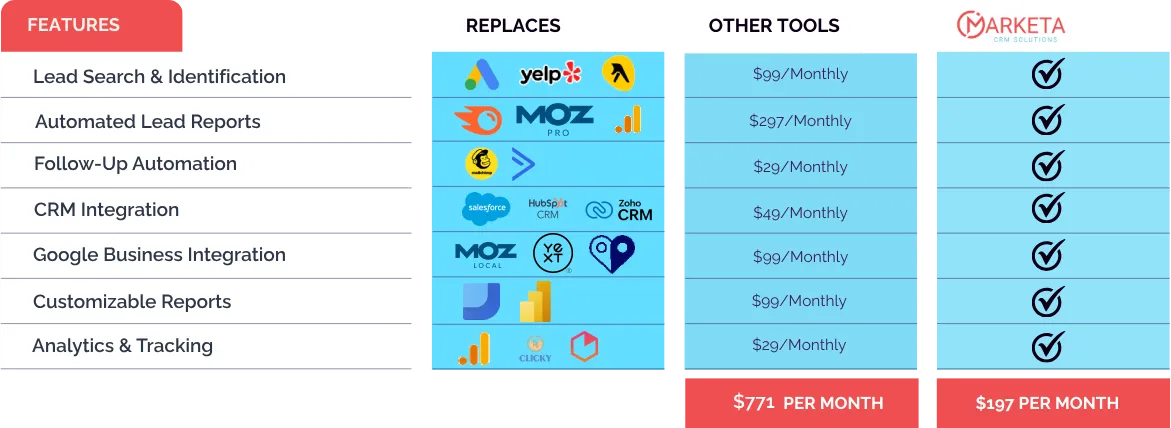
Your Lead Generation, Simplified

Take the guesswork out of prospecting. With Marketa’s all-in-one prospecting tool, you’ll find, follow up with, and convert leads faster than ever.

Get Started Today with Marketa’s Prospecting Tool!

Frequently Asked Questions

1. What is the Marketa Prospecting Tool?

The Prospecting Tool helps businesses identify potential leads by searching for companies based on location or keywords. It generates reports on these prospects' online presence, SEO metrics, reviews, and website performance, providing valuable insights to target and convert them into clients.

2. How do I use the Prospecting Tool to find leads?

Simply input your desired location or industry-specific keywords, and the tool will generate a list of prospects. You can then view detailed marketing reports, including SEO, reviews, and website performance, to assist you in making informed outreach decisions.

3. What kind of reports are generated for prospects?

The tool provides detailed marketing audit reports that assess business listings, online reviews, SEO performance, and website health (e.g., speed and responsiveness). These reports help you evaluate a prospect's online presence and suggest areas of improvement.

4. Can I automate follow-ups for prospects?

Yes! The Prospecting Tool integrates with Marketa’s CRM, allowing you to automate follow-up emails and SMS campaigns to nurture and engage leads effectively.

5. Does the Prospecting Tool integrate with other Marketa features?

Yes, it integrates seamlessly with Marketa's CRM and email automation features, allowing you to manage and track your leads from start to finish while ensuring continuous engagement.

6. How can I customize the prospect reports?

You can customize the marketing audit reports to focus on key areas like reviews, SEO, or website performance. This flexibility allows you to tailor the report to specific needs, making it easy to highlight the most relevant data for your prospects.

7. Can I search for local businesses using the Prospecting Tool?

Yes, the tool is ideal for finding local businesses. You can filter your search by location and industry to target prospects within your desired geographic area.

8. How many prospects can I generate reports for?

The number of prospects you can generate reports for depends on your subscription plan. Higher-tier plans offer more flexibility and higher limits for prospecting.

9. Can I track my prospecting results?

Yes, Marketa provides detailed analytics for your prospecting activities, including lead generation performance, conversion rates, and follow-up progress, helping you optimize your strategy.

10. What support is available if I need help with the Prospecting Tool?

Marketa offers extensive support via live chat, email, and a detailed knowledge base, providing step-by-step guides on using the Prospecting Tool and answering any questions you may have.

Frequently Asked Questions

Help Center

About
ABOUT
MARKETA
Pricing
PRICING &
FEATURES
Support
ONBOARDING
& SUPPORT
Ops
BUSINESS
OPERATIONS & FEATURES
Account
ACCOUNT
MANAGEMENT
1. What is the Marketa Prospecting Tool?
The Prospecting Tool helps businesses identify potential leads by searching for companies based on location or keywords. It generates reports on these prospects' online presence, SEO metrics, reviews, and website performance, providing valuable insights to target and convert them into clients.
2. How do I use the Prospecting Tool to find leads?
Simply input your desired location or industry-specific keywords, and the tool will generate a list of prospects. You can then view detailed marketing reports, including SEO, reviews, and website performance, to assist you in making informed outreach decisions.
3. What kind of reports are generated for prospects?
The tool provides detailed marketing audit reports that assess business listings, online reviews, SEO performance, and website health (e.g., speed and responsiveness). These reports help you evaluate a prospect's online presence and suggest areas of improvement.
4. Can I automate follow-ups for prospects?
Yes! The Prospecting Tool integrates with Marketa’s CRM, allowing you to automate follow-up emails and SMS campaigns to nurture and engage leads effectively.
5. Does the Prospecting Tool integrate with other Marketa features?
Yes, it integrates seamlessly with Marketa's CRM and email automation features, allowing you to manage and track your leads from start to finish while ensuring continuous engagement.
6. How can I customize the prospect reports?
You can customize the marketing audit reports to focus on key areas like reviews, SEO, or website performance. This flexibility allows you to tailor the report to specific needs, making it easy to highlight the most relevant data for your prospects.
7. Can I search for local businesses using the Prospecting Tool?
Yes, the tool is ideal for finding local businesses. You can filter your search by location and industry to target prospects within your desired geographic area.
8. How many prospects can I generate reports for?
The number of prospects you can generate reports for depends on your subscription plan. Higher-tier plans offer more flexibility and higher limits for prospecting.
9. Can I track my prospecting results?
Yes, Marketa provides detailed analytics for your prospecting activities, including lead generation performance, conversion rates, and follow-up progress, helping you optimize your strategy.
10. What support is available if I need help with the Prospecting Tool?
Marketa offers extensive support via live chat, email, and a detailed knowledge base, providing step-by-step guides on using the Prospecting Tool and answering any questions you may have.

Help Center

About
ABOUT
MARKETA
Pricing
PRICING &
FEATURES
Support
ONBOARDING
& SUPPORT
Ops
BUSINESS
OPERATIONS & FEATURES
Account
ACCOUNT
MANAGEMENT
1. What is the Marketa Prospecting Tool?
The Prospecting Tool helps businesses identify potential leads by searching for companies based on location or keywords. It generates reports on these prospects' online presence, SEO metrics, reviews, and website performance, providing valuable insights to target and convert them into clients.
2. How do I use the Prospecting Tool to find leads?
Simply input your desired location or industry-specific keywords, and the tool will generate a list of prospects. You can then view detailed marketing reports, including SEO, reviews, and website performance, to assist you in making informed outreach decisions.
3. What kind of reports are generated for prospects?
The tool provides detailed marketing audit reports that assess business listings, online reviews, SEO performance, and website health (e.g., speed and responsiveness). These reports help you evaluate a prospect's online presence and suggest areas of improvement.
4. Can I automate follow-ups for prospects?
Yes! The Prospecting Tool integrates with Marketa’s CRM, allowing you to automate follow-up emails and SMS campaigns to nurture and engage leads effectively.
5. Does the Prospecting Tool integrate with other Marketa features?
Yes, it integrates seamlessly with Marketa's CRM and email automation features, allowing you to manage and track your leads from start to finish while ensuring continuous engagement.
6. How can I customize the prospect reports?
You can customize the marketing audit reports to focus on key areas like reviews, SEO, or website performance. This flexibility allows you to tailor the report to specific needs, making it easy to highlight the most relevant data for your prospects.
7. Can I search for local businesses using the Prospecting Tool?
Yes, the tool is ideal for finding local businesses. You can filter your search by location and industry to target prospects within your desired geographic area.
8. How many prospects can I generate reports for?
The number of prospects you can generate reports for depends on your subscription plan. Higher-tier plans offer more flexibility and higher limits for prospecting.
9. Can I track my prospecting results?
Yes, Marketa provides detailed analytics for your prospecting activities, including lead generation performance, conversion rates, and follow-up progress, helping you optimize your strategy.
10. What support is available if I need help with the Prospecting Tool?
Marketa offers extensive support via live chat, email, and a detailed knowledge base, providing step-by-step guides on using the Prospecting Tool and answering any questions you may have.
Mobile FAQ Widget
About
About
Pricing
Pricing
Support
Support
Operations
Operations
Account
Account
1. What is Marketa?
Marketa is an all-in-one business platform offering scheduling, invoicing, CRM, and more.
2. How is Marketa different?
It replaces 5+ apps by combining tools into one dashboard, saving time and cost.
3. Who should use it?
Local businesses, agencies, and solopreneurs benefit most from Marketa.
1. What's the price?
$197/month — all major features included. No surprise fees.
2. Is there a trial?
Yes, 14-day risk-free trial. Cancel anytime before billing.
3. Discounts?
Annual billing saves 15%. Nonprofit discounts available.
1. What's in onboarding?
1-on-1 setup, data migration, training, and automation setup.
2. Do I need tech skills?
No coding needed. Our support handles setup for you.
3. Can I import contacts?
Yes, import via CSV or sync from your CRM.
1. What tools are built-in?
Booking, CRM, email/SMS campaigns, pipelines, social posting.
2. Can I automate texts?
Yes. Workflows send texts for reminders and follow-ups.
3. How does it simplify work?
It eliminates the need to juggle multiple tools or tabs.
1. Where’s billing info?
In the dashboard → Settings → Billing tab.
2. Can I add users?
Yes, invite users and assign roles easily.
3. How to get help?
Chat with support or explore our help center 24/7.

© Copyright 2022 Powered by New Identity Marketing